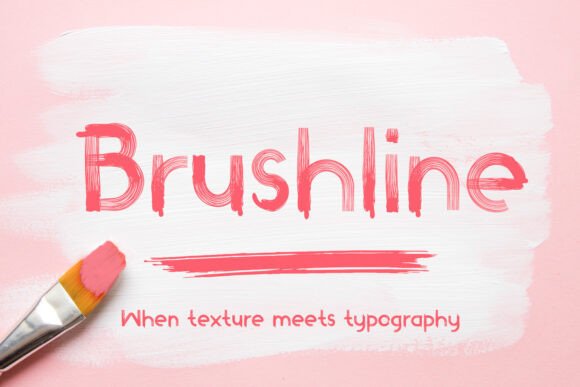
Brushline Font: A Bold Choice for Editorial Design
I was deep into redesigning the cover of a new digital magazine when I stumbled across Brushline. The name intrigued me — it sounded like a font that could bring movement and warmth to something that often feels static. As I previewed it, I knew immediately this wasn’t just another display font; it was a typeface with character, rhythm, and an artistic edge that felt right at home in the world of editorial design.
Brushline for Lifestyle Blog Headers and Magazine Covers
One of the first places I tried Brushline was in the header of a lifestyle blog layout. The title “Mindful Living” needed to feel both inviting and impactful. With its bold, textured strokes and subtle variation in weight, Brushline transformed the phrase from a simple headline into a visual anchor. It’s not just a font, but a mood — one that blends creativity with clarity, making it perfect for blog headers or magazine covers where you want to grab attention without overwhelming the reader.
The texture adds a handcrafted feel that modern sans serif fonts can’t replicate. While many display fonts lean too heavily on novelty, Brushline maintains enough structure to remain legible even at smaller sizes. That balance is rare and incredibly useful when designing for both screen and print.
Creating Visual Hierarchy with Brushline in Newsletter Graphics
In my newsletter layouts, hierarchy is everything. Readers need to quickly scan through sections, so each heading must serve a clear purpose. When I tested Brushline as a section opener in a wellness-themed newsletter, it elevated the tone instantly. The dynamic brush strokes gave a sense of energy and intention, while the clean baseline kept it grounded.
Using Brushline for newsletter graphics meant I could emphasize key topics without relying on color or shadow effects. It naturally draws the eye, which is especially helpful in email clients where visual flair is often stripped away. The result? A stronger brand identity and a more engaging experience for subscribers.
Brushline in Recipe Ebooks and Printable Guides
For a recent project — a printable guide on seasonal cooking — I needed a font that would feel warm and approachable yet still professional. Brushline fit the bill perfectly. Its bold presence made chapter titles pop, while the subtle texture suggested craftsmanship, aligning well with the theme of homemade meals and creative presentation.
What stood out most was how it complemented the imagery. Whether paired with photos of fresh ingredients or illustrations of kitchen tools, Brushline didn’t compete; instead, it harmonized. This makes it an excellent choice for recipe ebooks or printable guides where aesthetics and usability are equally important.
I also appreciated the included styles and alternates. Having options within the same font family allowed me to vary the look slightly across different pages — say, using a lighter version for subheadings or a heavier stroke for call-out boxes. It’s these small touches that make a display font feel versatile rather than gimmicky.
Enhancing Brand Identity with Brushline in Digital Product Design
When working on a digital course PDF about branding basics, I used Brushline to highlight key concepts and module titles. The font added a layer of personality to what could otherwise be a dry topic. It helped reinforce the idea that good design isn’t just about rules — it’s about expression.
As someone who values consistency in brand identity, I found Brushline’s unique style to be a great asset. It doesn’t blend in with every other display font out there, which means it helps your content stand apart. Just make sure to pair it with a more neutral serif font or sans serif font for body copy — the contrast keeps the layout from feeling too heavy.
Brushline for Wedding Guides and Creative Branding Projects
Wedding guides have a special requirement: they need to feel romantic yet refined. Brushline walked that line beautifully. I used it for headings like “The Ceremony,” “Vows & Readings,” and “Reception Themes.” The brushwork gave a personal, almost handwritten touch, while the modern edge prevented it from becoming too whimsical.
It also worked surprisingly well for creative branding projects. A client wanted a logo for a boutique wedding planner service, and after trying several script and handwritten fonts, Brushline emerged as the winner. It’s bold enough to command attention but elegant enough to suggest sophistication. The inclusion of ligatures and multilingual support was an added bonus for international audiences.
Why Brushline Stands Out in Course PDFs and Chapter Openers
Course creators often face the challenge of balancing professionalism with creativity. In a recent project for a photography course, I used Brushline for chapter openers and feature titles. The effect was immediate — it gave the course a more dynamic and visually rich layout.
Because it’s a display font, Brushline isn’t suited for long paragraphs, but it shines in short bursts of text. Think pull quotes, sidebars, or motivational blurbs. These elements become focal points thanks to the font’s natural rhythm and expressive form.
Another thing I noticed was how it handled spacing and kerning. Even though it has a lot of character, it never felt cluttered. That’s essential when building course PDFs or any publication where readability is key despite the use of decorative typefaces.
Brushline and Font Pairing in Magazine Layouts
Magazines thrive on variety and visual interest. In a mockup for a quarterly digital magazine about travel and culture, I paired Brushline with a minimalist sans serif for captions and navigation. The combination created a strong visual hierarchy — readers were drawn to the main headlines while easily scanning supporting text.
Here’s how I approached the pairing:
- Headlines: Brushline in bold weights to create impact and depth.
- Captions: A clean sans serif to ensure quick readability.
- Subheaders: Lighter variants of Brushline for softer emphasis.
This kind of thoughtful font pairing is what separates a polished publication from a cluttered one. Brushline brings the emotion and energy, while a secondary font ensures practicality and flow.
Readability Considerations for Screen and Print
While Brushline is undeniably stylish, it’s also smart to consider its performance across different platforms. On high-resolution screens, the texture looks beautiful and detailed. But on lower-end displays or mobile devices, some of the finer brushstrokes may get lost. For that reason, I recommend using it in larger sizes for maximum clarity — especially if your audience will be reading on smartphones or tablets.
When exporting to PDF or preparing for print, the font holds up impressively. The embedded textures translate well, adding a tactile quality to printed materials like printable planners or luxury packaging designs. However, always test it in your final output before going to press. Some printing processes might soften the edges, so it's worth ensuring it still reads clearly.
Brushline in Social Media Graphics and Logo Design
Social media is all about catching attention fast. For a launch post for a new podcast, I used Brushline in a custom graphic. The boldness of the font ensured the title remained legible even when scaled down to Instagram story size. And the texture gave it a human, authentic feel that matched the show’s vibe.
If you’re considering logo design or social media branding, Brushline can add a memorable dimension. It’s not a traditional script font, nor is it purely decorative — it’s somewhere in between, offering the best of both worlds. Just remember to evaluate licensing details if you plan to use it in commercial projects or paid newsletters.
Commercial Use and Licensing Notes
Before incorporating any font into your work, especially when creating commercial font assets for sale or distribution, it’s crucial to check the licensing terms. With Brushline, you’ll find that it supports various file formats, including those ideal for web and print. Make sure to confirm whether it allows embedding in PDFs, web use, or large-scale print runs depending on your needs.
Also, explore the included weights and alternates. They give you flexibility in how you apply the typeface across your publication. If you're selling design templates or creating design assets, knowing the full scope of the font package is essential to avoid future complications.
Brushline for Digital Artwork and Poster Design
I’ve used Brushline in a few poster designs lately, and it consistently delivers. One example was a promotional poster for a local art fair. The title “Creative Connections” had to feel both inviting and professional. Brushline brought the right amount of dynamism to the composition without overshadowing the visuals.
Its versatility extends beyond posters. I’ve also applied it in digital artwork mockups and branding proposals, where the font’s ability to convey both modernity and artistic flair is invaluable. Unlike many display fonts, it doesn’t demand excessive spacing or styling tricks to work — it simply fits into the design with ease.
Brushline in Pull Quotes and Decorative Accents
There’s a magic in the way Brushline handles pull quotes. In a recent issue of a digital magazine focused on personal growth, I used it to highlight inspiring quotes from featured interviews. The font’s expressive nature gave the quotes a sense of urgency and importance, guiding the reader’s focus naturally.
Brushline also works wonders as a decorative accent. I've used it in sidebars, watermarks, and even background text for subtle emphasis. Because it’s bold and has a distinct voice, it can function as a stylistic element without disrupting the overall layout.
Final Thoughts on Choosing Brushline for Your Next Project
Choosing the right font is more than just picking a pretty style — it’s about crafting an experience. Brushline does exactly that. Whether you’re designing a blog header, a recipe ebook, a wedding invitation suite, or a digital magazine, this display font brings both personality and precision.
Its unique texture and bold presence allow it to cut through the noise while maintaining a level of refinement that keeps your publication looking professional. And with careful font pairing and attention to detail in application, it can enhance your typography strategy significantly.
If you’re looking to elevate your next editorial project with a typeface that feels both modern and expressive, consider giving Brushline a try. It’s a font that invites curiosity and commands attention — two qualities every designer should strive for.